Re -Programming alarm key.
Posted: Tue Jan 09, 2007 6:29 pm
I think I am once agian being a bit slow and issing the bleeding obvious but...
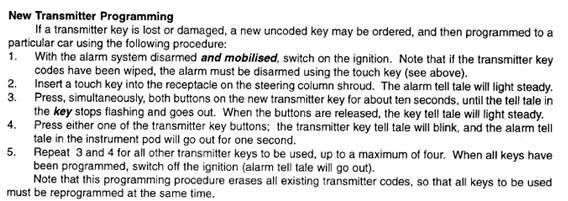
I bought a new fob off ebay and I need to code it to my alarm. I followed the instructions (I think) put both key fobs simultaneously into "discover" mode then manually enter the code into the car using the ignition key. Then press the button on the key fob 1, then press the button on key fob 2.
Key fob 1 works key fob 2 doesn't. Doesn't matter which one is 1 tried it all ways includiong the way where you get out of synch and have to ignore the alarm going off while you are doing it. What am I missing?
P
I bought a new fob off ebay and I need to code it to my alarm. I followed the instructions (I think) put both key fobs simultaneously into "discover" mode then manually enter the code into the car using the ignition key. Then press the button on the key fob 1, then press the button on key fob 2.
Key fob 1 works key fob 2 doesn't. Doesn't matter which one is 1 tried it all ways includiong the way where you get out of synch and have to ignore the alarm going off while you are doing it. What am I missing?
P


 No codes or anything needed