Page 1 of 1
help wanted
Posted: Tue Feb 03, 2009 10:40 pm
by c murray
colin here i cant put pics on gallery can some one help please p.m. me thanks colin

Re: help wanted
Posted: Tue Feb 03, 2009 10:42 pm
by Dominic
Re: help wanted
Posted: Tue Feb 03, 2009 10:55 pm
by c murray
tryed that did no work

Re: help wanted
Posted: Wed Feb 04, 2009 12:36 am
by tut
Colin
Been trying to contact you but no success. Could you give me a call please on 01771 622971.
Cheers
tut
Re: help wanted
Posted: Wed Feb 04, 2009 9:13 am
by robin
Colin, have you managed to upload any pictures to the image hosting site yet?
In case it's not clear, you must first upload pictures to something like photobucket, flickr, etc. The SE2 site itself doesn't host any pictures directly, it just points at pictures hosted elsewhere.
Then, once you've done that, you need to insert the [img=<url to your picture>] tag into the text. The bulletin board will translate this into an inline rendering of your image, or for those users that have image viewing turned off, it will translate to a [img] clickable link instead.
So where are you stuck - you need to tell us more about what isn't working so that we can help you make it work.
Cheers,
Robin
Re: help wanted
Posted: Wed Feb 04, 2009 9:38 am
by tut
Robin
You do not have to go through this process anymore. I now just click on "Upload attachment", browse you hard drive, "Add the file", click on "Place inline", and bingo.
tut
Re: help wanted
Posted: Wed Feb 04, 2009 9:48 am
by Shug
Please don't tut - that's not there for images (it can be used, but looks sh*t) It also takes up server space. The posted way is by far the best way to do it.
Re: help wanted
Posted: Wed Feb 04, 2009 10:19 am
by tut
Ah so. Did not realise that.
I have always done it through Photobucket, but when the new feature was added I was told that was how to use it.
Will revert to Img.
tut
Re: help wanted
Posted: Wed Feb 04, 2009 10:28 am
by Shug
The feature is really there to add things like route .axe files (although the forum is sniffy about what it'll let you upload) There's not really a space issue on the server, but it looks awful for most people, having scroll bars on photos and it does keep things much cleaner for our database if we ever have to move the data.
Cheers

Re: help wanted
Posted: Wed Feb 04, 2009 1:30 pm
by tut
ah, that explains where the scroll bars came from the couple of times that I used it.
Wondered why the pics had changed.
tut
Re: help wanted
Posted: Sat Feb 07, 2009 9:10 pm
by c murray
how do i get pics from photobucket on to gallery thanks colin

Re: help wanted
Posted: Sat Feb 07, 2009 9:39 pm
by robin
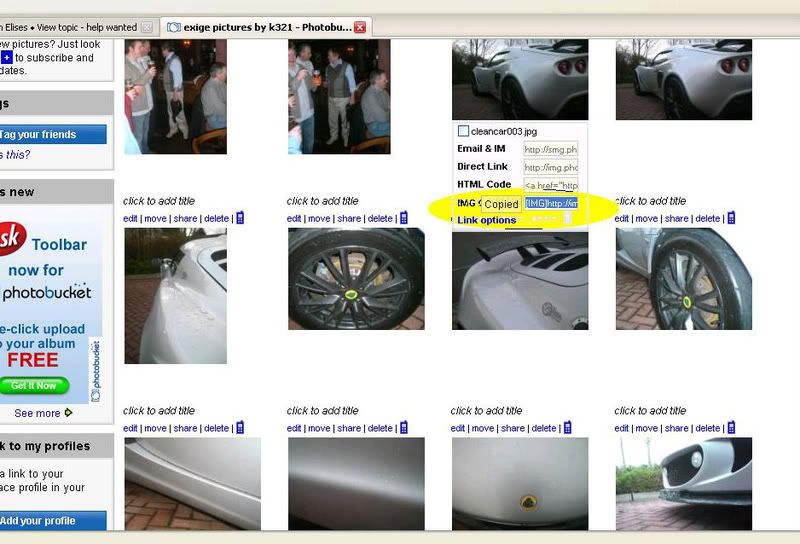
OK, so when you've logged into photobucket it shows you your photographs. If you click on a photo it will open a page with that photo top left and some "image code links" bottom right.
If you click on the text where it says "IMG Code - forums and bulletin boards" it'll highlight some mumbo-jumbo and pop up a wee yellow label saying "copied".
If you then go back to SE2 into a post that you're editing and paste (this will be control key + V or Edit menu, paste option or right mouse button, paste option depending on your browser). You'll see that something gets pasted into your post that starts with IMG in square brackets, a http:// url and then /IMG again in square brackets. When you press the preview button, you'll see your picture appears wherever you pasted the link.
Cheers,
Robin
// Here's an example IMG tag (I've turned off processing of these tags in this post so you can see it as it would appear to you - in normal posts it'll appear as a picture).
[IMG]
http://i96.photobucket.com/albums/l193/ ... cf0947.jpg[/IMG]
Re: help wanted
Posted: Sat Feb 07, 2009 9:40 pm
by kenny
Once the pics are uploaded to photobucket hover over the pic with the cursor, a drop down will automatically appear, left click on the bottom img tab. This copies the correct forum url complete with img coding, all you have to do is right click and past into your post and it should appear. Make sure your leave an enter/return between pics to avoid messing up the post.
Area highlighted for you, click that bit.